
3PL WMS Software: Features, Multi-Client Management & Multi-Tenant Operations
A third-party logistics provider doesn’t run one warehouse. It runs a dozen small ones inside the same four walls. Each client has its own products, its own receiving rules, its own order profile, and its own expectations for how fast things ship. At Avectous, we have spent 30 years working with operations like this, and we see the same problem again and again: software built for one company’s inventory starts to crack the moment a second client walks in.
A 3PL warehouse management system (3PL WMS) is built for that reality. In this guide, we explain how a 3PL WMS works, which features we think matter most, how it manages multiple clients, and what multi-tenant architecture means for a 3PL that wants to grow.
What Is 3PL Warehouse Management Software?
3PL warehouse management software is a system that tracks inventory, directs warehouse tasks, and documents billable activity for a third-party logistics provider handling goods for multiple clients. A 3PL warehouse management system (3PL WMS) does everything a standard WMS does, including receiving, putaway, picking, packing and shipping, but it does it for many inventory owners at once.
That last part changes everything. A standard WMS assumes one company owns everything on the shelves. A 3PL WMS assumes the opposite: the pallet in aisle 4 and the pallet beside it belong to different businesses, with different rules, and each one needs to see only its own data.
For the fundamentals of how a WMS works in any warehouse, start with our guide to the digital warehouse.
How Does 3PL Warehouse Management Software Work?
A 3PL warehouse management system ties every physical movement to a specific client and records it at the time it happens. We usually describe the flow like this:
Client inventory or order arrives → receiving → client-specific inventory record → storage → picking → packing → shipping → reporting and billing
Our 3PL WMS is time- and task-based. Every user is logged in, and the system records each task assigned and how long it takes to complete. That means every activity inside the warehouse is documented on our Avectous Connect platform, and it is why a 3PL can bill with confidence: the record of what was done already exists.
Because the rules are configurable, each client can have its own set of tasks. One client may need kitting before shipping, another may need cross-docking, and a third may need a pallet to go straight to a specific location. The 3PL WMS handles each one inside the same platform.
What Features Should 3PL WMS Software Have?
When we assess a 3PL operation, these are the capabilities we look for first in any 3PL warehouse management system:
- Multi-client inventory management, with each client’s SKUs and stock kept distinct
- Receiving, cross-docking and putaway rules that can be set per client
- Picking, packing and shipping with batch, wave and order picking, plus split orders
- RF handheld and barcode scanning so every movement is captured at the source
- Lot, serial and expiration tracking for clients whose products require it
- Cycle counting to reconcile inventory without disrupting operations
- Warehouse mapping, so pallets can go anywhere within the space
- Parent-child relationships with built-in tasking processes
- Value-added services, including kitting
- Billing support, so storage, handling, and shipping activity can be documented and invoiced accurately
- Client reporting and visibility, including branded client portals
- Role-based access and audit trails
- Integrations with ERPs, ecommerce platforms and carriers, and EDI
- Support for multiple warehouses
Two of these separate a real 3PL WMS from a standard system: billing and client-specific configuration. If the software can’t document what you did for each client, you end up reconstructing invoices by hand.
How Does a 3PL WMS Manage Multiple Clients?
A 3PL warehouse management system manages multiple clients by giving each one its own logical identity inside a shared platform. Each client’s inventory, orders, users, workflows, and reports stay separate, while your team runs everything from one place.
In practice, that works across six areas:
- Client accounts and inventory ownership. Every SKU is tied to its owner, so the system always knows whose stock it is handling. We go deeper on this in how to stop inventory mix-ups when one warehouse serves 20 clients.
- Client-specific workflows. Receiving, putaway, cycle count, value-added service, and pick-pack-ship rules can each be configured per client.
- Permissions. Your staff and your clients each see what is relevant to them. Role-based access controls keep one client from seeing another’s data.
- Order processing. Each client’s orders follow that client’s rules, service levels, and carrier requirements.
- Reporting. Clients can view inventory, open orders, invoices, and KPIs through branded portals, while you see performance across all accounts.
- Billing data. Because every task is logged with its time, you can document storage, handling, and shipping activity for each client and invoice it accurately.
What Is Multi-Tenant Warehouse Management Software?
Multi-tenant warehouse management software is a WMS platform that serves many customers, called tenants, from one shared system while keeping each tenant’s inventory, transactions, users, and reporting separate. For a 3PL, each client is a tenant.
The easiest way to picture it is an apartment building. Everyone shares the same structure, but each unit has its own door, its own keys and its own contents. In our multi-tenant 3PL WMS, each client gets its own logical instance, with separate workflows, service levels, and reporting views.
The alternative is running a separate system, or a separate set of spreadsheets, for every client. That works for two clients. It does not work for twenty.
How Does a Multi-Tenant 3PL WMS Support Growth?
Multi-tenancy is what lets a 3PL add clients without adding complexity. When we work with growing providers, these are the advantages we see:
- Faster client onboarding. A new client is configured inside your existing 3PL warehouse management system rather than set up as a new system.
- Consistent processes. Your team learns one system, so training and quality control stay manageable.
- Centralized administration. Settings, users, and rules are managed in one place.
- Per-client flexibility. Each client keeps its own workflows and service rules without breaking anyone else’s.
- Visibility across accounts. You can see operations in total and by client.
- Room to scale. Our platform is designed to grow with you, from a single building to a multi-site operation. If you’re weighing how automation fits into that growth, see where warehouse automation delivers the biggest return first.
3PL WMS vs. Standard WMS
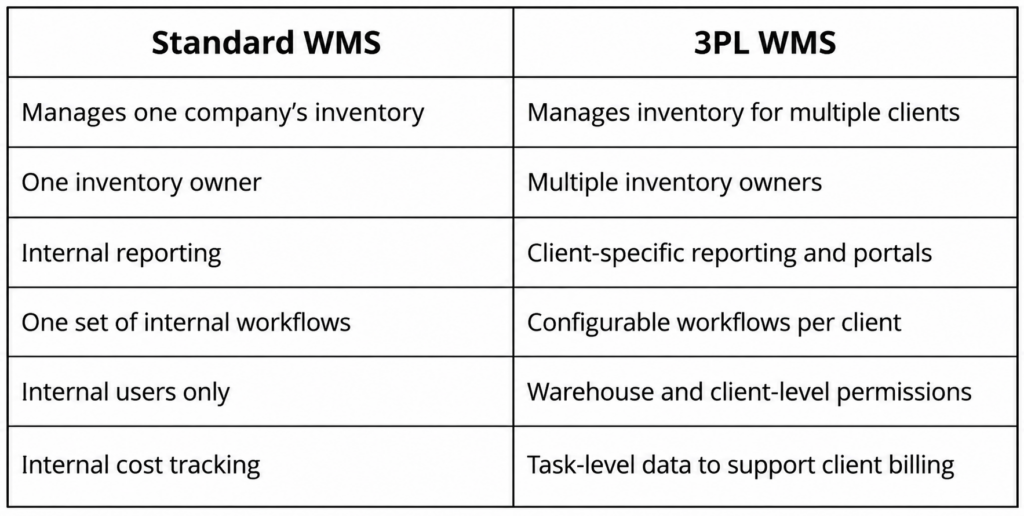
If you run a single-company warehouse, you don’t need all of this. If you serve more than one inventory owner, you do.
How to Choose a 3PL Warehouse Management System
Skip the generic software checklist. When you evaluate a 3PL WMS, these questions matter most:
- How many clients do you serve now, and how many do you expect to serve in two years?
- How complex is each client’s inventory? Think lot, serial, expiration, kitting.
- Can client-specific rules be configured without custom development?
- How does the system document billable activity?
- What do your clients expect to see, and how will they see it?
- Which integrations are required? ERP, ecommerce, EDI, carriers.
- Does it support more than one warehouse?
- How is it implemented and supported?
Peak season is a good stress test for all of them. We cover that in why the best 3PL warehouses rely on smarter WMS software during peak shipping seasons.
How Avectous Supports 3PL Warehouse Operations
We don’t ask a 3PL to bend around our software. We start with your client mix, your order profiles and your pain points, then build a demo that shows exactly how our 3PL warehouse management system would run in your warehouse. We configure the features and rules your operation needs and implement them in your building.
Our 3PL WMS is rules-driven and highly configurable, and it connects with marketplaces, accounting systems, CRMs, ERPs, and major shipping solutions.
To see how it would handle your clients, review our 3PL warehouse management software, read our 3PL case study, or schedule a discovery call.
Frequently Asked Questions
How is Avectous priced for a 3PL?
Pricing includes a one-time implementation fee based on scope, such as the number of warehouses, plus a monthly SaaS fee. Cloud services are billed based on the amount of data used.
What support comes with the software?
Our in-house support team is available during regular business hours. Regular software updates and any adjustments agreed in the scope of work are included in the monthly SaaS fee.
Does a 3PL need a warehouse control system (WCS) on top of a WMS?
Not with Avectous. We integrate with automation and cover the functions a traditional WCS provides, so you don’t need one in place.
Can a 3PL WMS work with robotics?
Yes. Our platform integrates with robotics out of the box, and we partner with Pallet Shuttle Automation to pair AI-powered robotic shuttle systems with our WMS.
Is a WMS the same as a WES for a 3PL?
No. A WMS manages inventory and directs warehouse tasks, while a warehouse execution system (WES) coordinates real-time order flow and equipment on the floor. We break down the difference in WMS vs. WES.
Do we still need our ERP if we use a 3PL WMS?
Usually yes. The ERP remains the system of record for finance and purchasing, while the 3PL WMS handles the detailed, location-level work inside the warehouse. If you’re deciding whether your ERP’s built-in tools are enough, read when an ERP needs dedicated warehouse capabilities.
Is Avectous a fit for a small 3PL?
Yes. We design Avectous to scale, so a smaller provider can start with the features it needs today and add more as its client list grows.