
Automated Order Routing & WMS vs. OMS: Understanding the Difference
A warehouse management system (WMS) controls warehouse tasks such as receiving, storage, picking, and shipping. An order management system (OMS) tracks orders across sales channels and coordinates how they’re fulfilled. When these systems share accurate inventory and order data, businesses can assign orders to suitable fulfillment locations and manage warehouse work more efficiently.
When orders come from online stores, marketplaces, and wholesale customers, businesses need a reliable way to manage inventory and decide where each order should be fulfilled. A warehouse management system and an order management system handle different parts of that process.
Understanding how they differ helps businesses choose the right software, reduce manual work and avoid fulfillment errors. At Avectous, we help businesses assess their warehouse and order workflows so they can identify the capabilities they need as operations grow.
What is the difference between WMS and OMS?
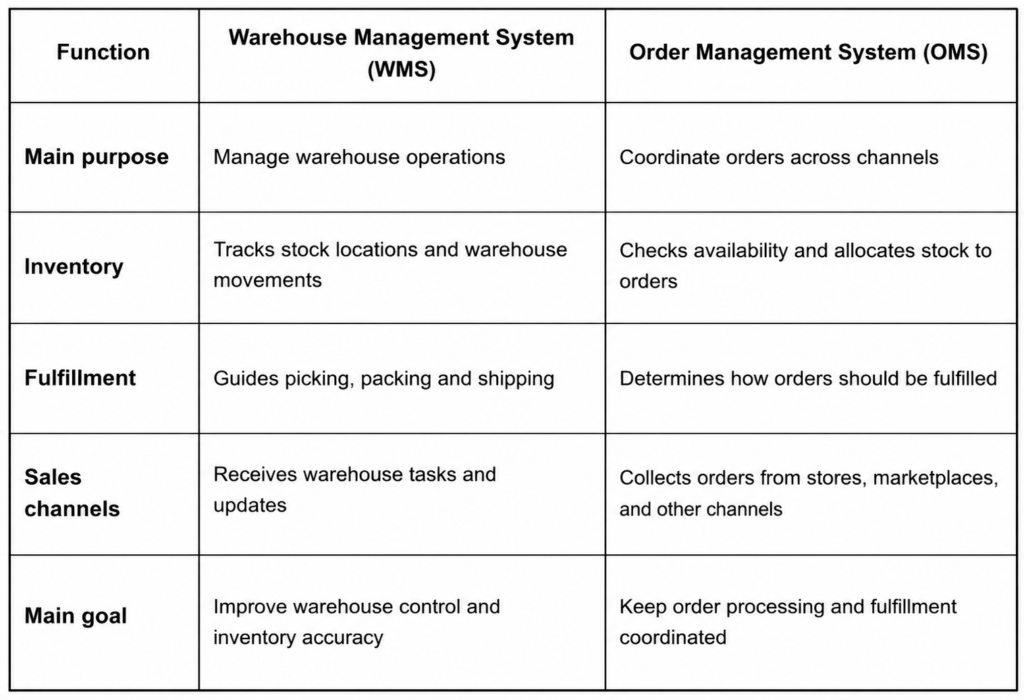
A WMS manages warehouse activities, while an OMS coordinates orders across sales channels. The two systems can share data but each has a different primary role.
WMS vs. OMS comparison
When does each system make sense?
A business with complex storage, picking, and receiving needs may benefit from a WMS. A retailer selling through several channels may need an OMS to consolidate orders and coordinate fulfillment.
Many growing businesses need both. Our warehouse and fulfillment solutions help businesses explore the capabilities required for their operations.
How does automated order routing work?
Automated order routing assigns orders to suitable fulfillment locations using rules and available data. It can consider stock levels, delivery destinations, warehouse capabilities and business requirements instead of relying on staff to make every decision manually.
What factors influence routing decisions?
A routing process may consider:
- Inventory availability: Does the location have enough stock to fulfill the order?
- Delivery destination: Which location can serve the customer’s address?
- Shipping requirements: Can the warehouse meet the required delivery service?
- Business rules: Are there restrictions involving products, locations or order types?
For example, a retailer with two warehouses may direct an order to the location that has the required items and can meet the delivery requirements.
How does the system handle exceptions?
Not every order follows the standard process. A product may be unavailable, an address may be incomplete or one warehouse may not be able to fulfill the entire order.
A reliable automated order routing process needs rules for these situations. Depending on the system, it may hold an order for review, split the shipment or direct the order to another eligible location. Staff should be able to identify exceptions and resolve them without losing track of the order.
How do WMS, OMS, and order orchestration work together?
Order orchestration coordinates the decisions and handoffs that move an order from purchase to delivery. The OMS manages the order workflow while the WMS directs warehouse execution.
A typical order workflow
- A customer places an order through an online store, marketplace or wholesale channel.
- The OMS captures the order and checks the relevant information and inventory availability.
- Routing rules select a suitable fulfillment location.
- The WMS directs the warehouse team through picking, packing and shipping.
- Shipment details and order status are updated in the connected systems.
For automated order routing to work reliably, these systems need accurate, timely information. If inventory updates arrive late, a system may assign an order to a location that no longer has enough stock.
Our order management software supports order processing, inventory checks and routing across multiple sales channels.
Why does integration matter?
When systems operate separately, employees may need to re-enter order details or check stock in several places. This increases the risk of errors and delays.
Connected systems help teams share order and inventory information. Businesses should still confirm which system owns each record, how often data updates and what happens when an integration fails.
How should you choose the right setup?
Start with the problems your operation needs to solve. If stock counts are unreliable or warehouse tasks are difficult to coordinate, review your WMS requirements. If orders arrive through several channels and need different fulfillment decisions, focus on OMS and routing capabilities.
Check your operational requirements
Before selecting software, review;
- Number of warehouses and sales channels
- Order volume and common order types
- Inventory visibility and accuracy requirements
- Existing e-commerce, accounting and shipping integrations
- Rules for split shipments, backorders and exceptions
Also consider whether your business needs multi-channel fulfillment. Our channel management software helps coordinate sales channels and inventory information across connected operations.
Plan the implementation
Map the current order journey from purchase to shipment. Identify manual steps, repeated data entry and common fulfillment problems. Then decide which processes should be automated first.
Test the setup with representative orders before expanding it across all channels or warehouses. Check inventory updates, routing decisions, exception handling and shipment notifications.
At Avectous, we recommend choosing capabilities around actual workflows rather than buying software based on feature lists alone. Contact our team to discuss your order and warehouse management requirements.
Frequently Asked Questions
Can a WMS work without an OMS?
Yes. A WMS can manage warehouse operations independently, particularly when order volumes and sales channels are relatively simple.
Does an OMS replace a WMS?
No. An OMS coordinates order processing while a WMS manages warehouse activities. Some platforms combine both capabilities.
Is automated order routing necessary for every business?
No. Businesses with simple workflows may route orders manually. Automation becomes more useful as order volumes, sales channels and fulfillment locations increase.
What is the main benefit of connecting WMS and OMS?
Connecting the systems helps coordinate order status, inventory availability and warehouse execution, reducing the need for manual updates between tools.